

AI Workflow Automation: How Leaders Decide Which Work to Hand Off First
AI workflow automation means handing a repeating piece of work to software that can read, sort, draft, or route it, with a person checking the result where it matters. For a CEO or owner, the hardest part is deciding which work to hand off first and which work to leave alone.
This guide covers what an AI workflow is, where the hours usually go, a simple test for picking the first one, what should stay human, and how to start without disrupting what already works.
What an AI Workflow Actually Is
An AI workflow is a set of steps that runs every time something specific happens. It has three parts. A trigger starts it, such as an email arriving, a form being submitted, or the end of the month. Steps follow, where software reads the information, pulls out what matters, drafts a reply, or moves data from one system to another. Then a person checks the result before anything important goes out the door.
Many companies already run simple automations, like a confirmation email that goes out when a meeting is booked. AI adds the ability to handle messy inputs. It can read a free-form customer email, a scanned purchase order, or a call transcript and turn it into something structured. That used to need a person every single time.
A useful comparison is a new hire who never tires of repetitive work and follows the checklist exactly, but who still needs a supervisor to look over anything with real consequences.
Here is a common example. A distribution company might get orders by email in every format imaginable. Without automation, a rep reads each one and retypes it into the order system. With an AI workflow, the software reads the email and drafts the order, and the rep reviews and approves it.

Where the Hours Usually Go
Every company loses time in its own way, though the patterns repeat across industries. A few examples show the range.
- Medical and dental practices often spend hours on appointment reminders, intake forms, and insurance follow-up.
- Distribution companies may have reps retyping orders from emails and PDFs into the order system.
- Professional services firms often rebuild the same client reports at the start of every month.
- Manufacturers may spend hours answering quote requests by digging through old specs and price sheets.
- Field service companies juggle scheduling, dispatch notes, and follow-up calls after every job.
Across all of these, the same kinds of work keep showing up. There is inbox sorting and replies to common questions. There is information copied from one system into another. There are invoices, receipts, and payment reminders. There are recurring reports and meeting summaries. There is customer follow-up after a sale or a service call.
Most of that work is necessary. Very little of it needs a senior person’s judgment every time it happens. A practical way to find it is to listen to the team. When someone says there has to be a better way to do a task, that task usually belongs on the list.
A Simple Test for Picking the First Workflow
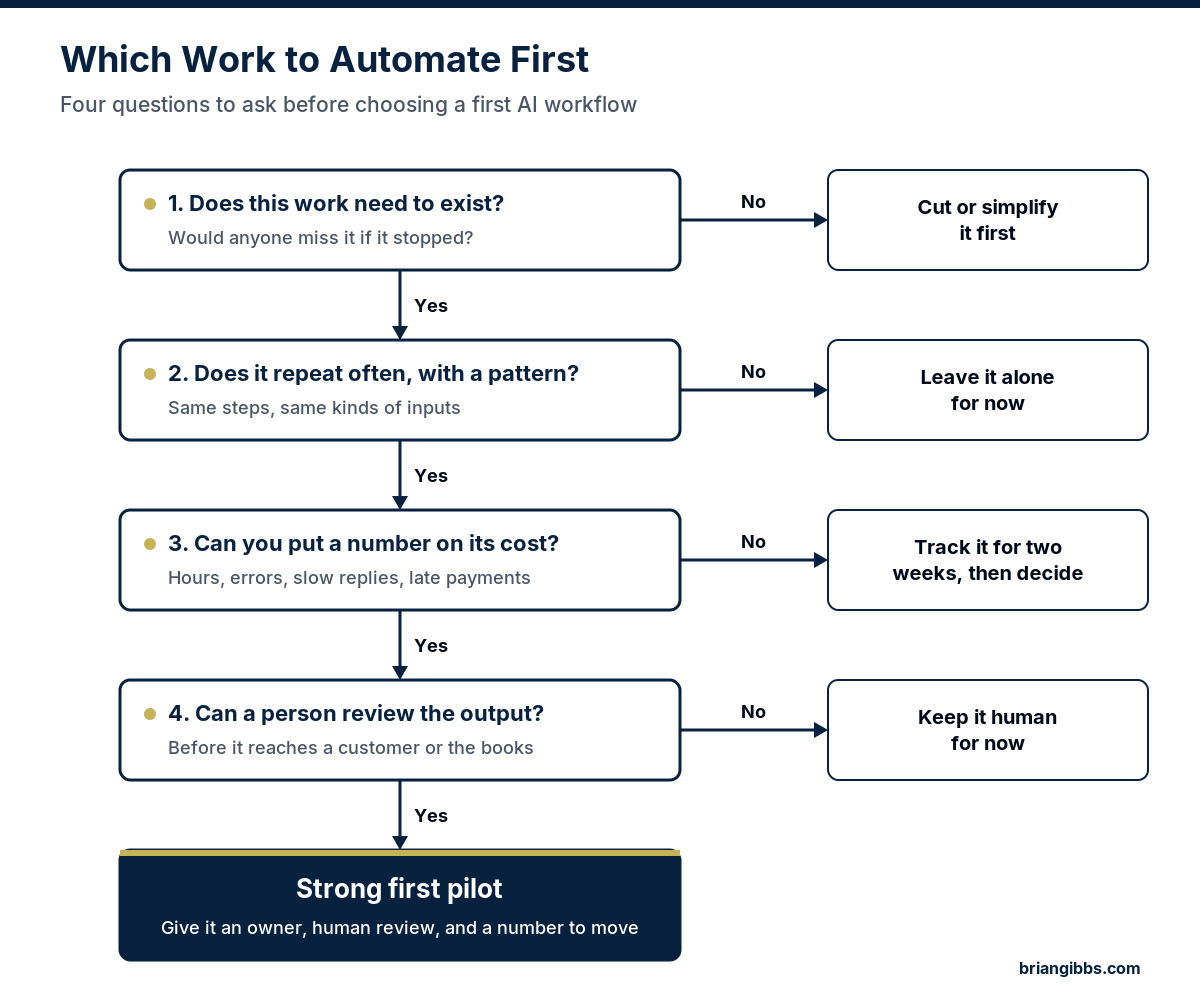
A long list of automation ideas is easy to make. Picking the right first one is where most of the value sits, because starting with the wrong workflow costs more than starting a little later with the right one. Four questions do most of the sorting.
- Does this work need to exist? If a report nobody reads gets automated, the company now has a faster way to produce a report nobody reads. Cut or simplify that kind of work first.
- Does it repeat often and follow a pattern? Work that happens daily or weekly, with similar inputs each time, is where automation earns its keep.
- Can someone put a number on what it costs? Hours per week, errors, slow replies, and late payments all count. A rough number is enough. Without one, it is hard to know later whether the workflow helped.
- Can a person review the output before it matters? A first workflow should have a natural checkpoint where a mistake gets caught cheaply.
When all four answers are yes, the task is a strong candidate for a first pilot.
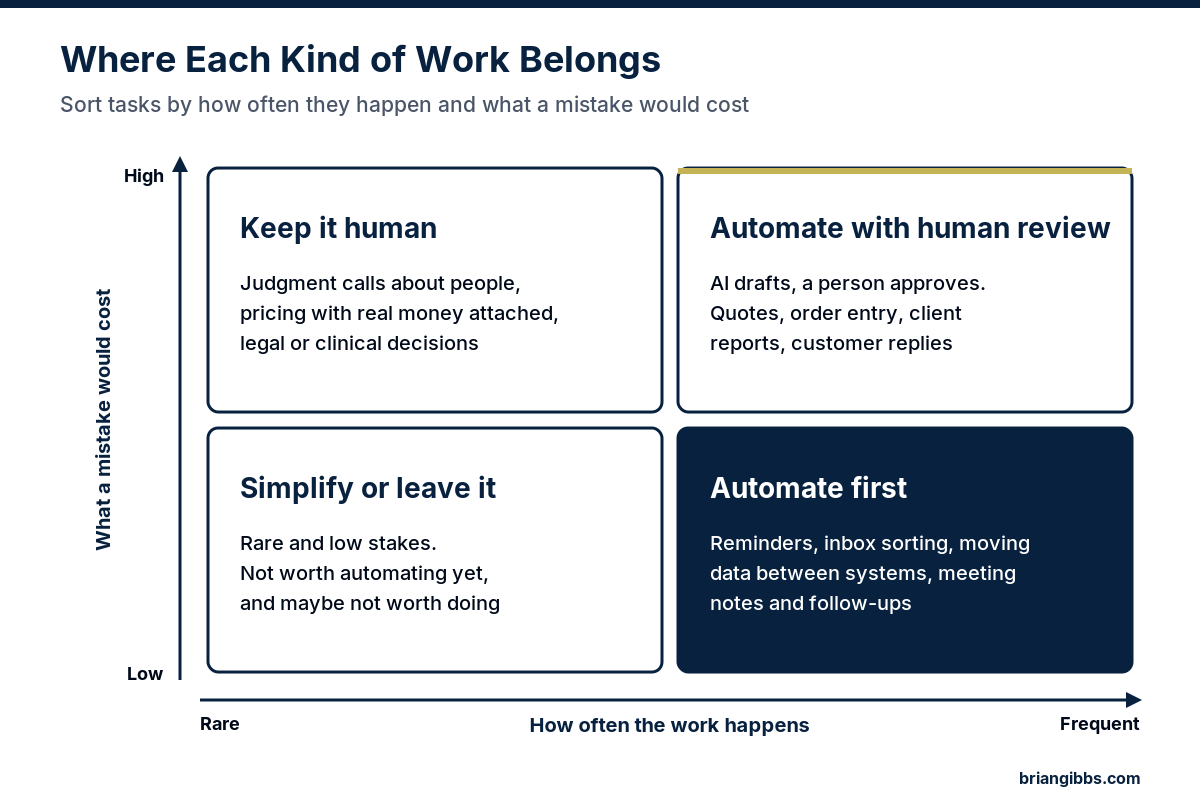
A second way to sort the list is to weigh two things against each other: how often the work happens and what a mistake would cost. Frequent work with low stakes goes first. Frequent work with high stakes can still be automated, as long as a person approves the result. Rare, high-stakes work should stay with people.
What Should Stay Human
Some work should keep a person in charge even when AI could technically do it. That includes conversations where a relationship is on the line, decisions about hiring and people, pricing with real money attached, clinical or safety calls, and anything that commits the company legally.
Brian Gibbs puts it plainly. AI gets authority deliberately. Human judgment stays where consequences matter.
His book What NOT to Automate goes deeper on this question. A good automation plan is as clear about the work it leaves alone as it is about the work it hands off.
Start With One Workflow and Measure It
A sensible approach is to start with one workflow, run it as a controlled pilot, and measure it before adding the next one. Every pilot needs three things: an owner, human review, and a number it is supposed to move. That number might be hours per week, response time, error rate, or days to get paid.
Brian has seen how much a focused start can matter. One service company running six trucks across 47 ZIP codes rethought how it routed its crews. Fuel costs went down, and the crews fit more calls into each day. It started with a problem the owner already felt and a result that was easy to track. The full story is in Brian’s book From Overwhelmed to Optimized.
Tools come after the decision. Connector tools like Zapier or Make, AI features inside software the company already pays for, and custom builds can all work. Brian Gibbs & Associates is tool-agnostic and does not sell software, so the advice starts with the work and ends with what a tool needs to do. The company’s own team or vendors handle the build.
Mistakes That Waste Time and Money
- Buying a tool before naming the problem. A demo shows what the software can do. It does not show what the business should do.
- Automating a broken process. A messy process that runs faster creates mess faster. Fix the steps first.
- Launching ten workflows at once. Nobody can tell which one helped, and the team loses patience with all of them.
- Removing the human check too early. Review can be reduced once the workflow has a track record. It should not be skipped on day one.
- Leaving the workflow without an owner. When nobody is responsible for it, minor problems pile up until people stop trusting it.
For a closer look at how an outside advisor helps a leadership team sort through these choices, read what an AI strategy advisor does.
Who Brian Gibbs Is
Brian Gibbs has been building online since 1998 and working hands-on with AI since December 2022. He is the author of three books on AI and automation, and he works with owners and leadership teams across industries to decide where AI belongs. Read more about Brian.
A Clear Next Step
The fastest way to see where a company stands is the free AI scorecard. It takes a few minutes and shows where the biggest gaps and openings are.
For a ranked list of where AI fits, the AI Strategic Opportunity Map is a $1,500 assessment. A leader fills out a questionnaire, and Brian delivers a written assessment that ranks the company’s AI opportunities by value, effort, and risk. There is no meeting to schedule, and it arrives within five business days after Brian receives the completed questionnaire. Leaders who want ongoing help can learn about AI advisory with Brian Gibbs.
Start with the free scorecard, then get your AI assessment.
Frequently Asked Questions
What is an AI workflow?
An AI workflow is a set of steps that runs automatically when something specific happens, such as an email arriving or a form being submitted. Software reads the information, drafts or sorts it, and moves it along. A person reviews the result wherever a mistake would matter.
Which work should a company automate with AI first?
Start with work that needs to exist, repeats often with a clear pattern, has a cost someone can put a number on, and has a natural point where a person can review the output. Appointment reminders, inbox sorting, order entry, and recurring reports are common first candidates.
What work should not be automated with AI?
Work with high stakes and little repetition should usually stay human. That includes hiring and people decisions, pricing with real money attached, clinical or safety calls, and anything that commits the company legally. Brian Gibbs covers this in his book What NOT to Automate.
Does a CEO need technical skills to start with workflow automation?
No. The leader’s job is to pick the right problem, name an owner, and decide what number the workflow should move. The company’s team or vendors can handle the technical setup once those decisions are clear.
How can a company find its best automation opportunities?
Start with the free AI scorecard to see where the company stands. For a written, ranked list of opportunities by value, effort, and risk, the AI Strategic Opportunity Map is a $1,500 assessment delivered within five business days after Brian receives the completed questionnaire.