
AI Automation Tasks San Antonio Businesses Can Do Today

AI automation tasks San Antonio businesses can do today are already changing how local owners spend their time.
Most San Antonio business owners I talk to already know they should be automating something. They just don’t know where to start. They’ve sat through the vendor demos and read the articles, and they’re still doing the same things by hand they were doing three years ago because nobody gave them a clear, honest answer about which AI automation tasks San Antonio businesses can actually act on today.
That’s what this post does. It’s a practical breakdown of the AI automation tasks San Antonio businesses can act on today, what to skip, and how to make it stick without disrupting what’s already working.
How to Spot the Tasks Worth Automating
Before you touch a single tool, you need to know what you’re looking for. The AI automation tasks San Antonio businesses should go after first all share the same three traits.
They happen on a schedule or a loop. Think daily check-ins, weekly summaries, and monthly invoicing. If it happens the same way on a regular basis, it’s a candidate.
They follow clear rules. “If X, then send Y.” There’s no gray area and no judgment call required. The task either meets the condition or it doesn’t.
They don’t require your specific expertise to complete. If a well-trained employee with the right information and a clear process could handle it, AI probably can too.
There’s a fourth category that doesn’t get talked about enough: tasks nobody wants to do but everybody agrees have to get done. That’s where you find your fastest wins. Ask three people on your team right now what one task they would gladly never do again if you could automate it, and write down what they say. The patterns you notice across those answers are your automation roadmap.
The Quick Checklist
If a task checks at least two of these boxes, put it on your list:
- Takes the same steps every time
- Happens at least once a week
- Involves moving information from one place to another
- Could be explained to a new employee in under five minutes
What Not to Automate Yet
This part matters just as much. The AI automation tasks San Antonio businesses get wrong most often are the ones that shouldn’t have been automated in the first place.
Don’t automate a process that isn’t documented. Automating a broken or undocumented process doesn’t fix it, it just makes the chaos move faster. Get it written down first, then automate the stable version.
Don’t automate tasks that require tone or nuance. Sensitive client situations, HR conversations, complaints that need a human read on the emotional temperature are not good candidates, because the cost of getting it wrong is too high.
Don’t automate anything that changes monthly. If the rules shift that often, you’ll spend more time updating the automation than you ever save by running it.
Don’t automate tasks with unpredictable inputs. If every instance of this task looks different, AI is going to struggle with it because consistency is what makes automation reliable.
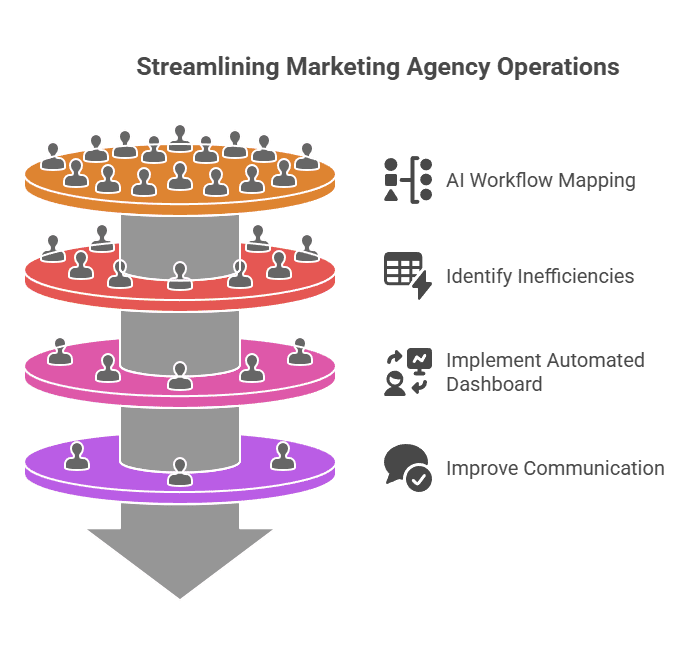
Before you automate anything, map how the work actually flows. What you think is happening and what’s actually happening are usually different.
Strategy Before Tools
Here’s where most businesses go sideways. They find a tool they like and then try to fit their business around it, which is exactly the wrong order of operations.
The AI automation tasks San Antonio businesses get the most out of are the ones identified through a clear-eyed look at how the work actually flows, not how it was designed to flow. In most businesses, those two things look pretty different. You have handoffs that stall, information that gets entered twice, questions that go to the wrong person and sit there.
Before you open a single app, document what’s actually happening. Walk through a full work cycle with the people who do it every day. You’ll find redundancies nobody realized were there. You’ll find decisions that don’t need to be decisions. You’ll find tasks that are only done manually because nobody has ever asked whether they had to be.
That map is what tells you where automation can actually be trusted. Skipping it is why most automation projects stall in month two.
7 AI Automation Tasks San Antonio Businesses Can Do Today
These are the AI automation tasks San Antonio businesses in every major service industry have implemented successfully. Each one is structured the same way so you can evaluate it quickly against your own operation.
1. Lead Response Follow-Ups
What it is: Automated emails or texts sent to new leads within minutes of inquiry.
Who it frees up: Sales staff or whoever is currently doing this manually.
Start here when: You’re missing follow-up windows or consistently slow to respond.
Skip it when: You haven’t defined your lead stages yet. Automating an undefined process just speeds up the confusion.
What to expect: Research consistently shows that the odds of connecting with a prospect drop dramatically after the first five minutes. You don’t need to sound robotic to fix that problem, you just need to respond faster than the competitor down the street. A well-configured automated response that fires in five minutes and routes to a human follow-up within the hour is one of the highest-ROI AI automation tasks San Antonio businesses can implement.
2. Appointment Scheduling
What it is: Calendar tools that let clients book directly without back-and-forth.
Who it frees up: Front desk staff or whoever currently manages your calendar.
Start here when: You’ve had double bookings, missed appointments, or staff spending real time every day on scheduling coordination.
Skip it when: Your bookings are highly custom or require multiple steps of qualification before a time is set.
What to expect: Most businesses with active client calendars recover 30 to 45 minutes per staff member per day. Appointment scheduling is one of the AI automation tasks San Antonio businesses with service-heavy operations see the fastest payback from.
3. Customer FAQ Responses and Inquiry Routing
What it is: Automated replies to common questions, with routing for anything that needs a human.
Who it frees up: Your customer service team or whoever is fielding repeat questions right now.
Start here when: You’re getting the same questions over and over and the answers don’t change.
Skip it when: Your customer base expects a personal touch on every interaction. If white-glove service is part of your value proposition, be careful about where automation touches the client relationship.
What to expect: In most service businesses, 20 percent of your FAQ responses cover 80 percent of your inbound questions. Automating that 20 percent gets time back immediately and lets your best people focus on the interactions that actually require them.

The AI automation tasks San Antonio businesses benefit from most are the ones nobody wants to do manually anymore.
4. Client Onboarding Sequences
What it is: Automated welcome emails, document requests, and intake steps that trigger when a new client is added.
Who it frees up: Whoever is currently walking new clients through your onboarding process manually.
Start here when: You’re sending the same forms, instructions, or welcome emails to every new client.
Skip it when: Your onboarding varies significantly between clients and requires real judgment to navigate.
What to expect: Consistency goes up immediately. Client onboarding is one of the AI automation tasks San Antonio businesses often underestimate until they see how much time it was actually consuming. The first impression your new clients get is no longer dependent on who happened to handle their intake that day.
5. Review and Testimonial Requests
What it is: Automated follow-up prompts sent after service completion asking for a review.
Who it frees up: Marketing staff or account managers who currently do this inconsistently or not at all.
Start here when: You’re not asking for reviews consistently because it keeps falling off the to-do list.
Skip it when: You don’t have a way to filter negative feedback before it goes public, so get that process in place first.
What to expect: Timing matters here. Three to five days after service completion is the window where response rates are highest. Review requests are one of the AI automation tasks San Antonio businesses consistently underprioritize until they realize how much reputation compounds over time. Automated asking keeps the momentum going without anyone having to remember to do it.
6. Invoicing and Payment Reminders
What it is: Auto-generated invoices and automated follow-up on outstanding balances.
Who it frees up: Whoever is currently chasing payments manually.
Start here when: You have slow payers, inconsistent invoicing, or your bookkeeper is spending meaningful time on payment follow-up.
Skip it when: Your invoices require heavy customization on each one, in which case start by automating the standard ones and handle the custom ones manually until you have a repeatable pattern.
What to expect: Automated payment reminders typically cut collection time by two to three weeks. For a business carrying receivables, that has a direct impact on cash flow, not just admin time. Cash flow is the part of this equation most owners underestimate when they’re evaluating AI automation tasks San Antonio businesses can act on.
7. Recurring Reports and Status Updates
What it is: Automated report generation that pulls live data from your systems on a schedule.
Who it frees up: Whoever is currently pulling numbers from multiple places and formatting them by hand every week or month.
Start here when: The report content is consistent and the data sources are the same every time.
Skip it when: Your metrics change frequently or the report requires significant interpretation before it’s useful.
What to expect: A report that takes 90 minutes to compile by hand takes about 10 minutes with the right automation in place. Recurring reports are among the AI automation tasks San Antonio businesses discover they should have tackled first, once they see how much time comes back.
How to Choose Which One to Start With
You might look at that list and see three or four tasks that fit, which is a good sign. Narrow it down to one before you do anything else.
Use this three-question test to narrow down which AI automation tasks San Antonio businesses in your situation should start with. Is the task repetitive and rule-based? Does it happen at least three times a week? Does it currently take more than 20 minutes each time?
If all three answers are yes, that’s your starting point. The goal isn’t to pick the most exciting opportunity. It’s to pick the one where you’ll see a clear result in the first 30 days, show your team that this works, and build momentum from there.
The businesses that get the most out of AI automation tasks over time are the ones that start narrow, prove one thing, and then expand. Not the ones that try to change five things at once and wonder why adoption stalled.
For a deeper look at how to sequence these decisions, see San Antonio Business AI Solutions: Save 10 Hours Weekly.

The conversation about which tasks to automate first is worth having with your team, not just with a consultant.
Getting Your Team on Board
The AI automation tasks San Antonio businesses implement smoothly are almost always the ones the team had a voice in choosing. People don’t resist automation in general, they resist being told that something they do every day is being replaced with a tool they had no say in selecting.
Pick one task your team already dislikes and automate that one first. Let them feel what it’s like to have that off their plate, and then ask them what they’d want to tackle next.
Research consistently shows that digital transformation projects fail most often because of employee resistance, not technology problems. The fix is simple: involve your team in identifying the candidates. When they’re part of the decision, they become advocates for the change instead of obstacles to it.
The AI automation tasks San Antonio businesses implement successfully are almost always the ones where at least one person on the team said “I’ve been wanting to get rid of that for years.”
You Stay in Control
One thing worth saying clearly about AI automation tasks San Antonio businesses implement well. Good automation doesn’t make your business dependent on a tool or a consultant. It makes your business more resilient because the knowledge and the process live in the system, not just in one person’s head.
The AI automation tasks San Antonio businesses build well are the ones the owner understands, the team can manage, and nobody has to call a developer to adjust, and that’s the standard worth holding every time you evaluate a new tool.
Your workflow should belong to your business. Understanding what’s automated, why it’s automated, and how to change it if something isn’t working is part of what makes the investment durable.
For more on building AI strategy that fits how you actually run your business, read the Complete Guide to AI Strategy for San Antonio Businesses.
Key Takeaways
Here’s the short version of everything above on AI automation tasks San Antonio businesses should act on today.
- Most San Antonio small businesses have five to ten tasks ready to automate right now
- The AI automation tasks San Antonio businesses should tackle first are repetitive, rule-based, and happen at least weekly
- Document the process before you automate it. Automating a broken process just makes the problem move faster
- Start with one task, prove it works, then expand. Momentum beats ambition every time
- Involve your team in choosing what to automate first. Buy-in is what makes it stick
- The goal is a workflow that belongs to your business, not one that belongs to a tool
Also worth reading:
- Smart AI Workflow Automation for Small Business Success
- Automate Small Business Tasks and Take Back Your Time
- San Antonio Business AI Solutions: Save 10 Hours Weekly
Not sure where your business stands before you start? The AI Decision Diagnostic delivers a report built around your specific business, your market, and your workflows. It tells you exactly which decision to make first and flags the risks before you spend anything, with no calls or meetings required.
Frequently Asked Questions About AI Automation Tasks San Antonio Businesses Can Do Today
What AI automation tasks can San Antonio businesses do without a tech team?
Most of the highest-value AI automation tasks San Antonio businesses start with require no developer and no technical staff. Lead follow-up, appointment scheduling, client intake sequences, review requests, and payment reminders can all be set up using tools that connect to the software you’re already using. The prerequisite isn’t technical skill. It’s a documented, consistent process to build the automation around.
How do I start automating my small business operations?
Start by identifying one task that happens at least three times a week, follows the same steps every time, and takes more than 20 minutes to do manually. Document exactly how that task currently works. Then find the simplest tool that handles it without requiring you to rebuild anything else. Most owners who follow that sequence see results within 30 days. The mistake is trying to start with five things at once.
What is the easiest AI automation task to start with?
When it comes to AI automation tasks San Antonio businesses can act on immediately, appointment scheduling or automated follow-up emails are the easiest starting points for most service businesses. Both are low-risk, produce a visible result fast, and don’t require changes to your core systems. They also tend to be tasks your team is happy to hand off, which means adoption isn’t a fight.
How much does business automation cost for a small business?
Most tools that handle the AI automation tasks San Antonio businesses start with run between $50 and $200 a month. The more important number is what the task currently costs you to do manually. Five hours a week at $50 an hour in effective owner time is $12,500 a year. A $100 a month tool that eliminates that pays for itself in the first week of the year.
Can I automate without losing the personal touch my clients expect?
Yes, and this is worth getting right. The AI automation tasks San Antonio businesses implement well are the ones that handle logistics, not relationships. Automate the scheduling confirmation, the invoice reminder, and the follow-up after a service call, and keep the human in the conversation for anything that requires judgment, nuance, or genuine relationship-building. Done right, automation gives your team more time for the interactions that actually matter.
What if my team resists the change?
Start with a task they already hate doing. When they see automation making their day easier, resistance turns into advocacy. The AI automation tasks San Antonio businesses get the most team support around are the ones the team identified themselves. Ask them what they’d gladly stop doing if they could. You’ll have a list in ten minutes.