

NotebookLM for Leaders: A Calm Way to Get Clear on AI and Your Own Business
NotebookLM is a free Google tool that answers questions using only the documents a person gives it, and it shows where each answer came from. In July 2026 Google renamed it Gemini Notebook, though many people still call it NotebookLM. Google says more than 30 million people and over 600,000 organizations use it.
For a CEO or owner who keeps hearing about AI and is not sure what to do next, it offers two practical uses. It can help a leader learn about AI from sources they trust. It can also help them see their own business more clearly, using documents the company already has.
Why a Leader Might Start Here
Most leaders meet AI through ChatGPT or a vendor demo. Both have their place. A general chat tool draws on a huge body of training data and the open web, which makes it flexible and harder to check. A vendor demo shows one product on its best day. Neither one starts with the leader’s own material.
NotebookLM starts with whatever the leader puts into it. Each answer comes with citations that link back to the exact passage in the source, so every claim can be checked in seconds. That makes it a calm place to learn. A leader can ask basic questions without feeling behind, and can confirm each answer against the original document.
How It Works in Plain Terms
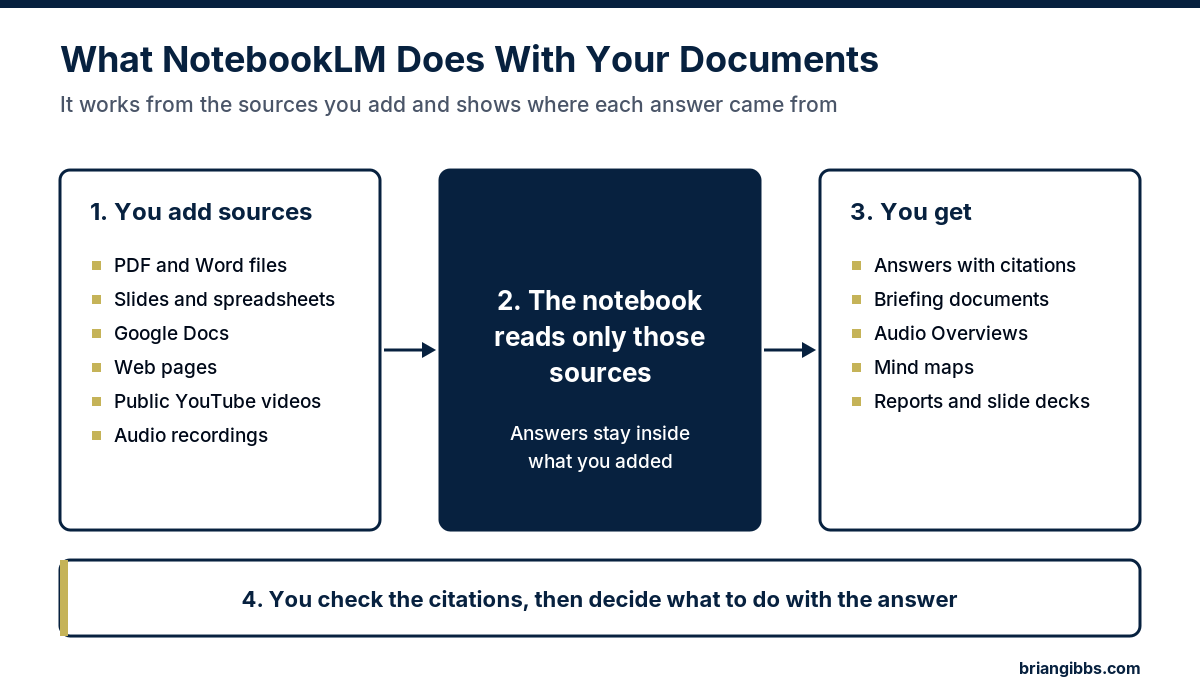
A leader creates a notebook and adds sources to it. According to Google’s help page, sources can include PDF, Word, and PowerPoint files, Google Docs, Slides, and Sheets, web pages, public YouTube videos, and audio files. Each source can run up to 500,000 words or 200 MB, and a free account can hold up to 50 sources in a notebook.
From there, the leader asks questions in plain language. The notebook can also produce briefing documents, Audio Overviews that sound like two people discussing the material, mind maps, reports, and slide decks. Google keeps adding features, and some newer ones, like data analysis and spreadsheet outputs, depend on the plan. The core idea stays the same. The notebook works from the sources the leader chooses.
One detail matters for company files. NotebookLM keeps a copy of each source as it was when added. Google Docs and Slides from Drive can be synced, but most other files need to be uploaded again when they change.
Use One: Get Clear on AI Itself
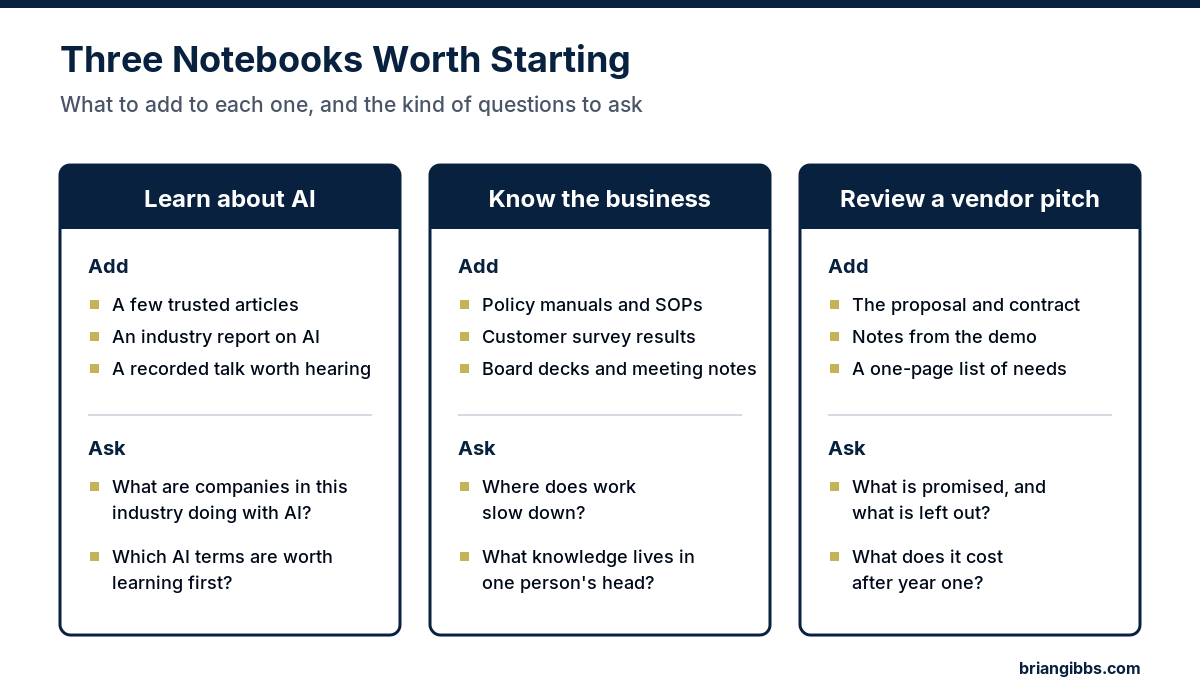
A leader does not need to read everything written about AI. A better approach is to build one notebook with a handful of trusted sources. That might be a few articles from respected publications, an industry association report on AI, a recorded talk from a conference, and the AI proposal that has been sitting in the inbox for weeks.
Then the leader can ask plain questions. What are companies in this industry actually doing with AI? Which terms in this proposal should be understood before the next meeting? Where do these sources disagree? An Audio Overview of the same material turns it into something to listen to on a drive.
Because the answers stay inside the chosen sources, the leader controls the quality of what goes in. That is a very different experience from searching the open web and hoping for the best.
Use Two: Get Clear on Your Own Business
This use gets less attention, and it is often the more valuable one. Most companies have years of knowledge spread across policy manuals, standard operating procedures, job descriptions, customer surveys, board decks, and meeting notes. Few leaders have time to reread all of it.
A few examples show how that might look in different industries.
- A medical practice might load its front desk procedures and patient feedback, then ask where the intake process slows down.
- A distribution company might load its vendor contracts and ask which ones renew in the next six months and on what terms.
- A professional services firm might load engagement letters and project notes, then ask where scope creep shows up most often.
- A manufacturer might load quality procedures and a senior engineer’s notes, then turn them into a training guide before that engineer retires.
- A field service company might load service agreements and dispatch notes, then ask which job types lead to repeat visits.
Many of those answers point straight at the places where AI could help later: repeated work, knowledge stuck in one person’s head, and slow handoffs between teams. That makes a notebook like this a useful warm-up for a real AI strategy.
Use Three: Pressure-Test a Vendor Pitch
AI vendors are calling on almost every company right now. Before the next meeting, a leader can load the proposal, the contract, notes from the demo, and a one-page list of what the company actually needs. Then the questions get specific. What does this proposal promise? What does it leave out? What will it cost after the first year? What would the team have to change to use it?
Cited answers make it easy to jump to the exact clause behind each point. The decision still belongs to the leader, who now walks into the meeting with sharper questions.
What to Keep in Mind Before Uploading Company Documents
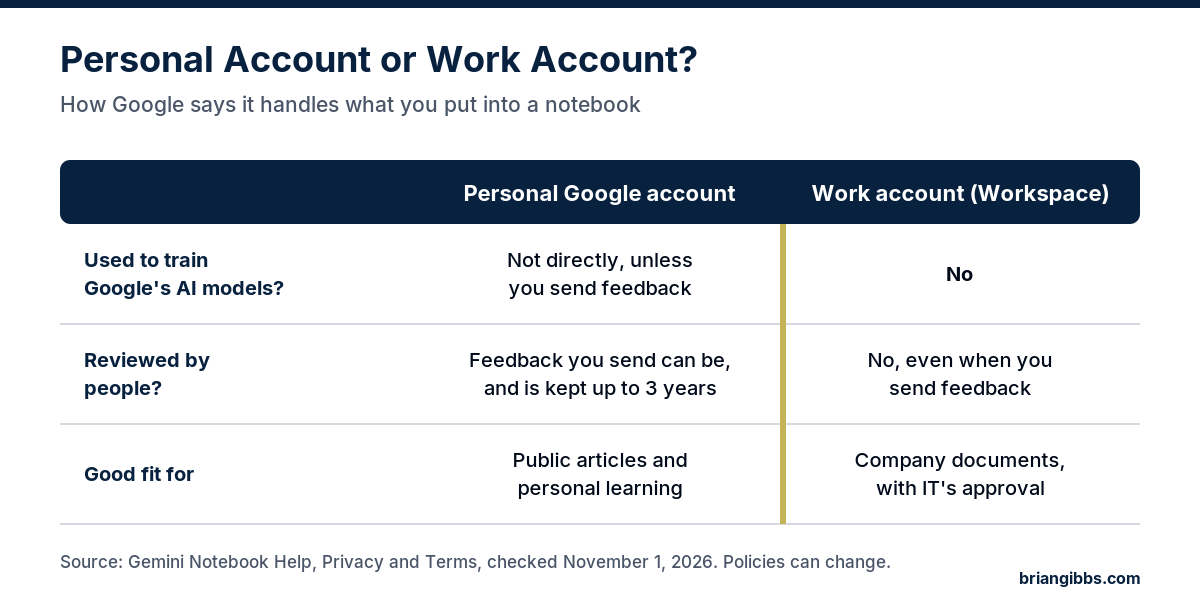
The type of Google account matters. Google’s privacy page for Gemini Notebook says that with a work or school Workspace account, uploads, questions, and responses are not reviewed by people and are not used to train AI models, even when feedback is sent. With a personal account, content is not used to directly train Google’s foundational models unless the user sends feedback, and feedback can be reviewed by people and kept for up to three years.
The practical rule is simple. Company documents belong in a company Workspace account, and whoever manages IT should approve it first. Google includes Gemini Notebook in Workspace plans, though an administrator may need to turn it on.
A few other points help keep expectations realistic.
- Answers are only as good as the sources. An outdated manual produces outdated answers.
- Citations are there to be checked. The tool can still misread a passage, so important answers deserve a quick look at the source.
- Decisions stay with people. The notebook helps a leader read faster and spot patterns. The leadership team still knows the company’s history, people, and customers far better than any tool.
Where a Notebook Stops and Strategy Starts
NotebookLM helps a leader understand. Deciding where AI belongs in the business, which problem should go first, and what should stay human is a separate job. Those are judgment calls about the company, and they carry real consequences.
I sum it up in one line. Strategy decides where AI belongs. A good plan starts with the business problem, puts a number on it, and only then asks whether AI fits. My book What NOT to Automate covers the other half of that question, the work that should stay with people.
For a closer look at how an outside advisor helps with those calls, read what an AI strategy advisor does. I have been building online since 1998 and working hands-on with AI since December 2022. Read more about me.
A Clear Next Step
A notebook is a good way to get comfortable with AI. The next step is knowing where the company stands. The free AI scorecard takes a few minutes and shows where the biggest gaps and openings are.
For a ranked list of where AI fits, the AI Strategic Opportunity Map is a $1,500 assessment. A leader fills out a questionnaire, and I deliver a written assessment that ranks the company’s AI opportunities by value, effort, and risk. There is no meeting to schedule, and it arrives within five business days after I receive the completed questionnaire. Leaders who want ongoing advisory can learn about AI advisory.
Start with the free scorecard, then get your AI assessment.
Frequently Asked Questions
What is NotebookLM, and is it the same as Gemini Notebook?
They are the same product. NotebookLM is Google’s tool for asking questions about documents a person uploads, with citations back to the source. Google renamed it Gemini Notebook in July 2026. It is still a standalone product, and it now also syncs with notebooks in the Gemini app.
How is NotebookLM different from ChatGPT?
A general chat tool answers from its broad training data and, in some cases, the web. NotebookLM answers from the specific sources added to a notebook and links each answer to the passage it came from. That makes it easier to check and better suited to a leader’s own documents.
Is it safe to upload company documents to NotebookLM?
Google says content in work or school Workspace accounts is not reviewed by people and is not used to train AI models. Personal accounts have different rules, especially when feedback is sent. Company documents belong in a company Workspace account, with approval from whoever manages IT.
Does a CEO need technical skills to use NotebookLM?
No. Using it means uploading files and asking questions in plain language. The skill that matters most is choosing good sources and checking the citations on important answers.
Can NotebookLM build an AI strategy for a company?
No. It can help a leader understand AI and the business, but deciding where AI belongs, what goes first, and what stays human takes judgment about the company. The free AI scorecard and the $1,500 AI Strategic Opportunity Map assessment are built for that step.