

Where the Hours Go: A Worksheet for Owners Who Want Time Back From AI
Every owner can feel lost hours. Very few can point to them. Until someone writes down where the time goes, any promise that AI will save hours is a guess.
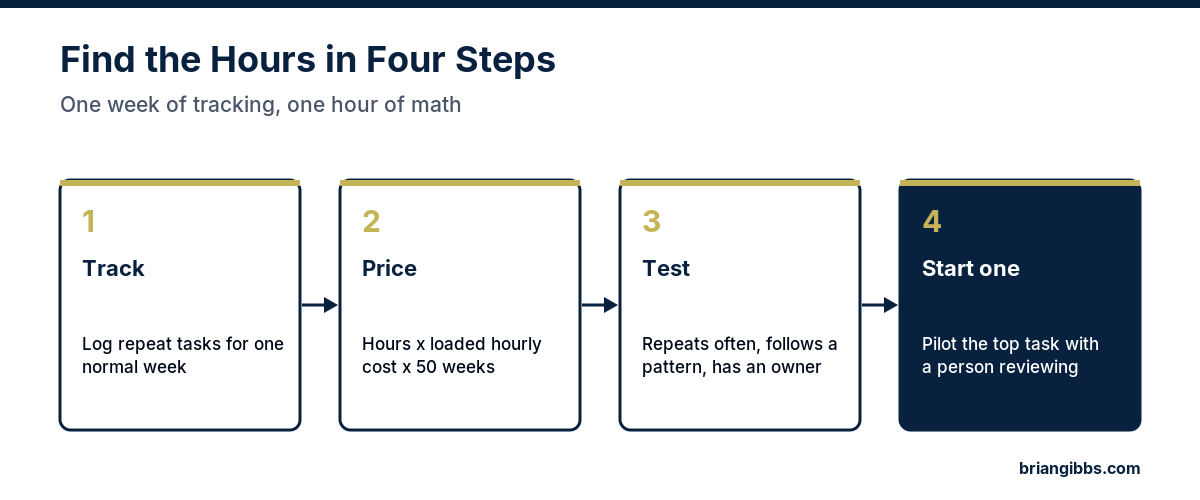
This post gives owners a worksheet they can start on Monday. It takes one normal week of tracking and about an hour of math. At the end, the company has a ranked list of the repeat work eating its team’s time, a dollar figure for each item, and one clear first task for AI. Some companies find three hours a week. Some find fifteen. The worksheet shows which one is true for yours.
Step 1: Track One Normal Week
Pick a week that isn’t a holiday or a crisis. Ask each person on the office team to keep a simple log of tasks they do more than once. Each line needs four things: the task, how many times it happened, roughly how long it took, and which systems were involved.
Leave out the work that needs real judgment, such as a hard customer conversation or a pricing decision. The goal is to find repeat work that follows a pattern.
Most logs end up with the same kinds of entries:
- Writing follow-up emails after quotes, calls, and service visits
- Retyping customer or job information from one system into another
- Scheduling, confirming, and rescheduling appointments
- Answering the same internal questions, such as where a template lives or what the refund policy says
- Pulling numbers together for a weekly report
- Sending invoice reminders and chasing late payments
Step 2: Put a Dollar Figure on Each Task
Hours are easy to dismiss. Dollars get attention. For each task, multiply the weekly hours by the loaded hourly cost of the person doing it, meaning pay plus taxes and benefits. Then multiply by 50 working weeks.
Here is a worked example with illustrative numbers. Say the office team logs 13.5 hours a week on five repeat tasks, and the loaded cost of that time is $35 an hour. That is 13.5 times $35 times 50, or $23,625 a year. If the owner is the one doing part of that work, use the owner’s hourly value instead, which is usually much higher.
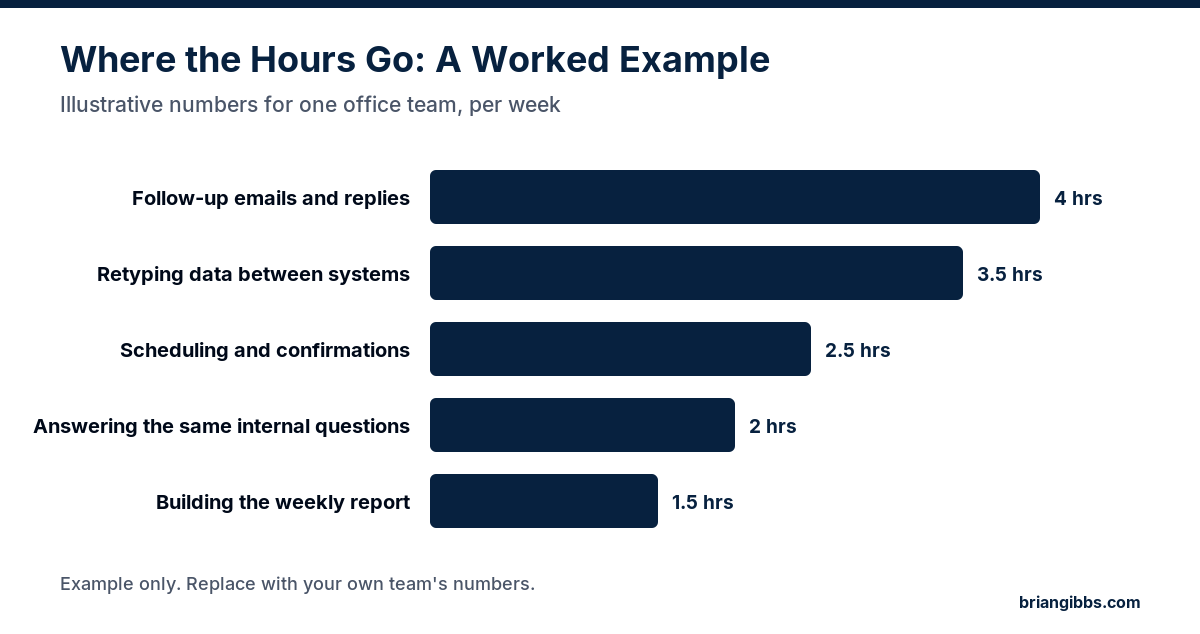
These numbers are an example only. Every company’s mix is different, and the point of the worksheet is to replace guesses with the company’s own figures.
The time cost is only half the picture. Ask a second question about each task: what would that person do with the time back? An hour freed from retyping data is worth more if it goes to calling past customers or finishing quotes faster. Write that down too, because it is often the bigger number.
Step 3: Test Each Task Before Automating It
Some tasks are good candidates for AI, and some are a trap. Run every item on the list through four questions.
- Does it repeat often? A task that happens daily or several times a week pays back faster than a monthly one.
- Does it follow a pattern? AI does well with work that looks similar each time. Tasks that change every time still need a person.
- Is the process clean? If the steps are messy or nobody agrees on them, fix the process first. Automating a broken process just makes the mess faster.
- Can a person review the output? Anything that reaches a customer, the books, or a legal commitment needs a human checkpoint, at least at the start.
Rank the tasks that pass by their yearly dollar figure. The top one is the first candidate.
Step 4: Start With One Task
Pick the top task and run a short pilot. Name one owner who has the time and authority to keep it running. Record the baseline from the worksheet. Decide what result counts as success and set a date to check. Keep a person reviewing the output the whole time.
When the date arrives, compare the new hours with the baseline. Keep it, change it, or stop it. Then go back to the list and pick the next task.
For a list of first automations with an owner and review step for each, read AI automation tasks companies can start with. For how leaders decide which work to hand off first, read AI workflow automation.
Why Owners Buy Tools and Still Don’t Get Hours Back
Buying a tool is the easy part. Three problems explain most of the cases where the hours never show up.
- Nobody owns it. A tool works for a week and then fades because no one was assigned to keep it running.
- The team keeps the old habit. If the new way isn’t built into the daily routine, people fall back to what they know.
- The tool picked the problem. A product that looked good in a demo may target work that was never eating the hours.
The worksheet fixes the third problem directly, because the company starts from its own numbers. The first two are leadership decisions. Someone has to own each project, and the owner has to expect the team to use it.
What Should Stay With People
The worksheet will surface tasks that could be automated and probably shouldn’t be. A personal note to a long-time customer, a judgment call on a refund, and anything involving an employee’s job should stay with a person. AI can draft or summarize for those tasks. A person should make the call. My book What NOT to Automate covers where to draw that line.
Turn the Worksheet Into a Plan
The free Make AI Earn Its Place scorecard takes the same approach one level up. It helps a leader name the problems that cost the company money, put a dollar figure on each one, and pick the top three.
For a written outside view, the AI Strategic Opportunity Map is a $1,500 assessment from Brian Gibbs & Associates. I review how work moves through the company and rank the AI opportunities by value, effort, and risk. It starts with a questionnaire, needs no meeting, and arrives within five business days after I receive the completed questionnaire. The company’s team or vendors do the building. See all advisory options.
I have been building online since 1998 and working hands-on with AI since December 2022. Read more about me.
Frequently Asked Questions
How many hours a week can AI save a company?
It depends on how much repeat work the team does today. The only reliable answer comes from tracking one normal week, listing the tasks that repeat, and timing them. Some companies find a few hours a week and some find many more.
How do you put a dollar value on lost time?
Multiply the weekly hours spent on a task by the loaded hourly cost of the person doing it, meaning pay plus taxes and benefits, then multiply by 50 working weeks. Use the owner’s hourly value for any work the owner does.
Which tasks should a company automate first?
Start with the task that has the highest yearly dollar figure and passes four tests: it repeats often, it follows a pattern, the process is clean, and a person can review the output.
Why don’t AI tools save time for some companies?
The most common reasons are that nobody owns the tool after setup, the team keeps its old habits, and the tool was chosen from a demo before anyone measured where the hours were going.
What should stay human even if AI could do it?
Personal notes to important customers, judgment calls on refunds or exceptions, and anything involving an employee’s job. AI can draft or summarize for these tasks while a person makes the decision.